Checking an existing BIM model against the point cloud: 14 deviations and what they mean for your project
A 3D model that looks complete is not automatically a reliable model. Recently a client sent us an existing 3D model of a multi-storey building together with the point cloud it was supposedly based on. The model had not been created by VMTS. Before taking over the project, our team did what we do with every incoming dataset: we overlaid the model with the point cloud and compared them section by section.
The result: 14 documented deviations, 8 of them critical, with height differences of up to approx. 36 cm and a floor slab modelled inside an elevator shaft. This article shows what we found, why errors like these are expensive, and how you can check a BIM model against the point cloud before you build on it.
In short
- 01
A model-to-point-cloud check overlays the BIM model with the scan data and measures where geometry and reality differ.
- 02
In this case we documented 14 deviations in a spot check, 8 of them critical.
- 03
Measured differences: approx. 16 cm at floor level, approx. 19.5 cm at a component surface, approx. 36 cm in wall height.
- 04
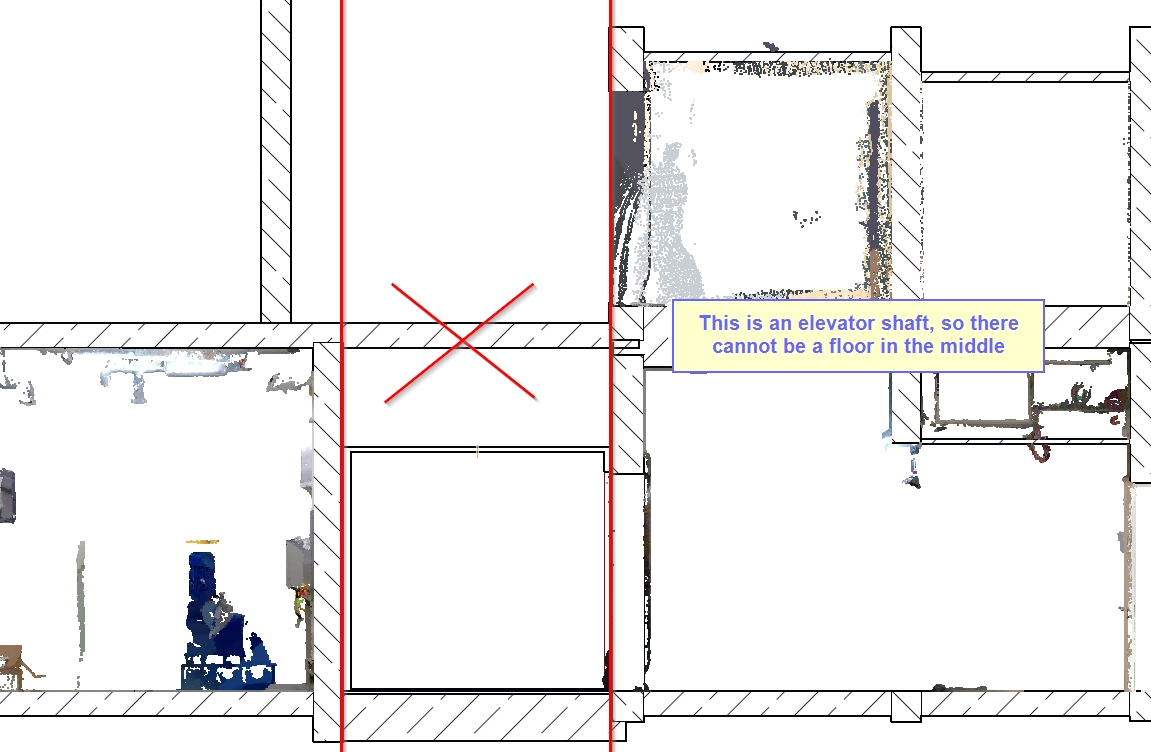
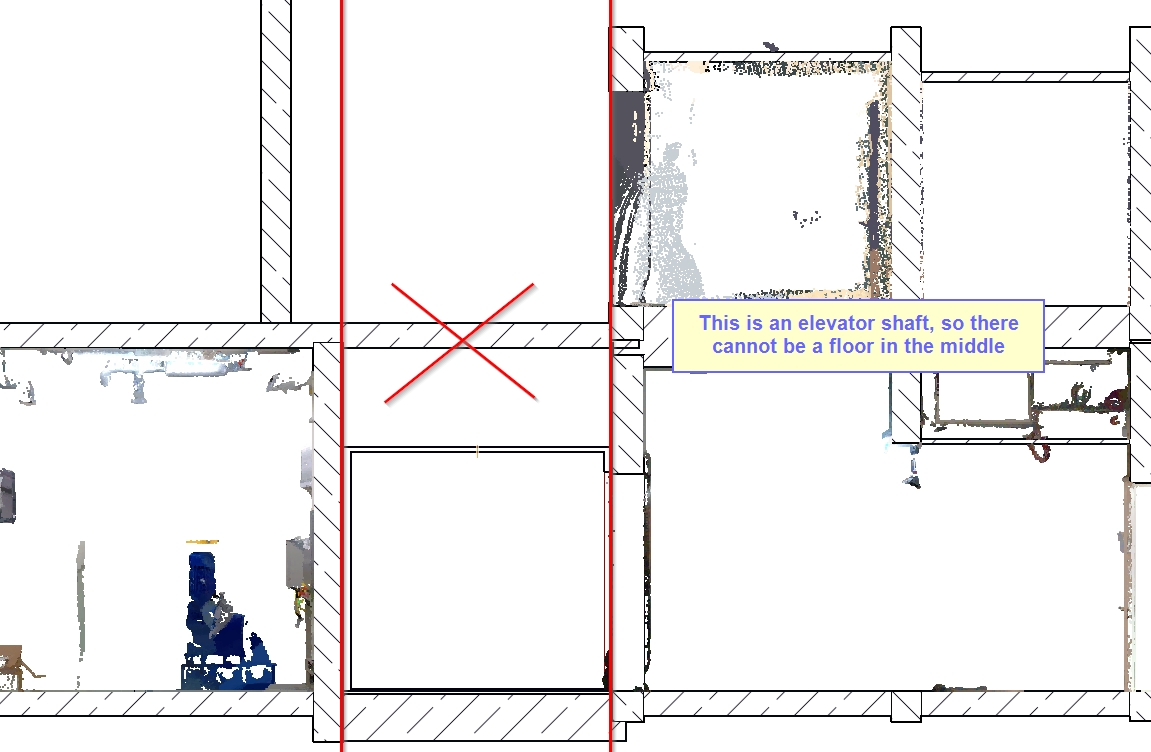
Several errors were logically impossible, for example a floor slab inside an elevator shaft.
- 05
Systematic errors like these cannot be fixed point by point. A rebuild from the point cloud is usually the more reliable option.
What is a model-to-point-cloud check?
A model-to-point-cloud check is a quality control step in which an existing BIM or 3D model is overlaid with the registered point cloud of the building. Floor plans and sections are compared storey by storey, and the distance between model geometry and scanned surfaces is measured. The check shows whether a model can be used as a planning basis or whether it deviates beyond the agreed tolerance.
What we found: 14 deviations in one model
We checked the model in sections and floor plans at selected locations across several storeys. The documented points are a sample, not a complete check. Given how often errors occurred, further deviations in unchecked areas are likely. We grouped the findings into five categories:
| Category | Example from the model | Measured / observed | Consequence |
|---|---|---|---|
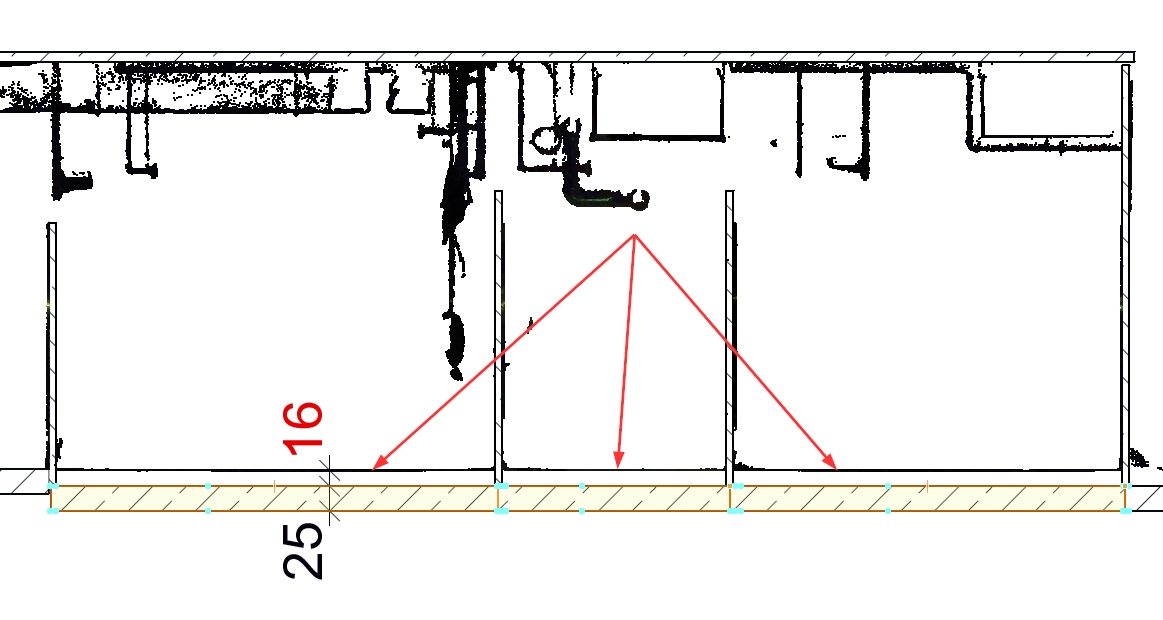
| Height levels | Floor surface below the scanned floor | approx. 16 cm | All levels and clear heights on this storey are wrong |
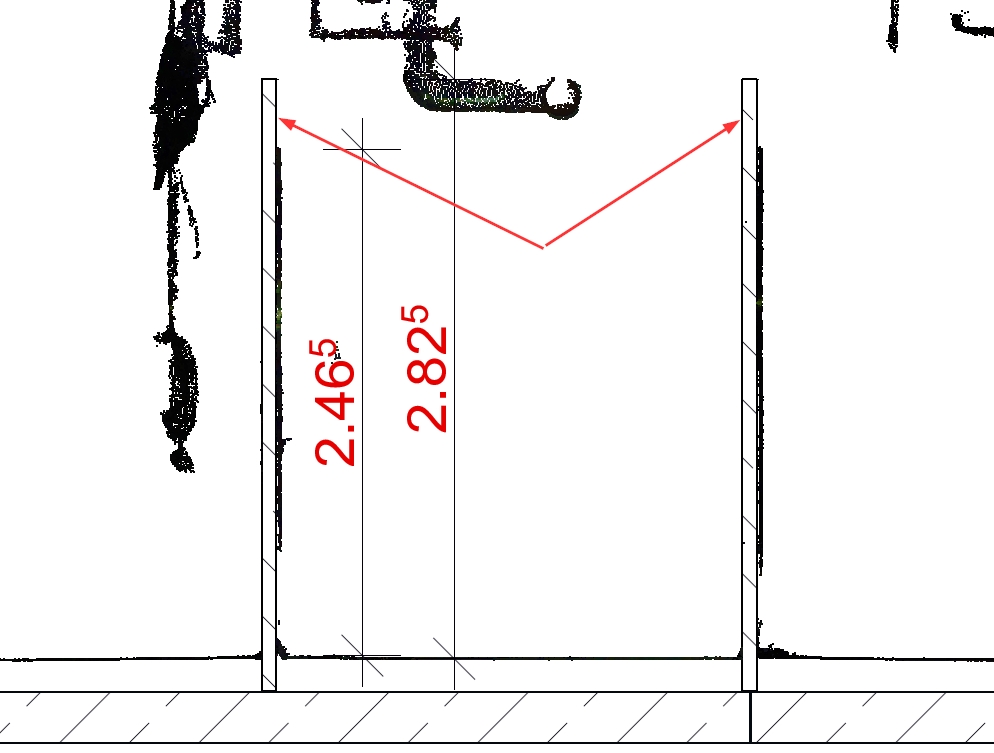
| Height levels | Partition walls too high | 2.825 m in the model vs. 2.465 m scanned (approx. 36 cm) | Wrong wall areas, quantities and elevations |
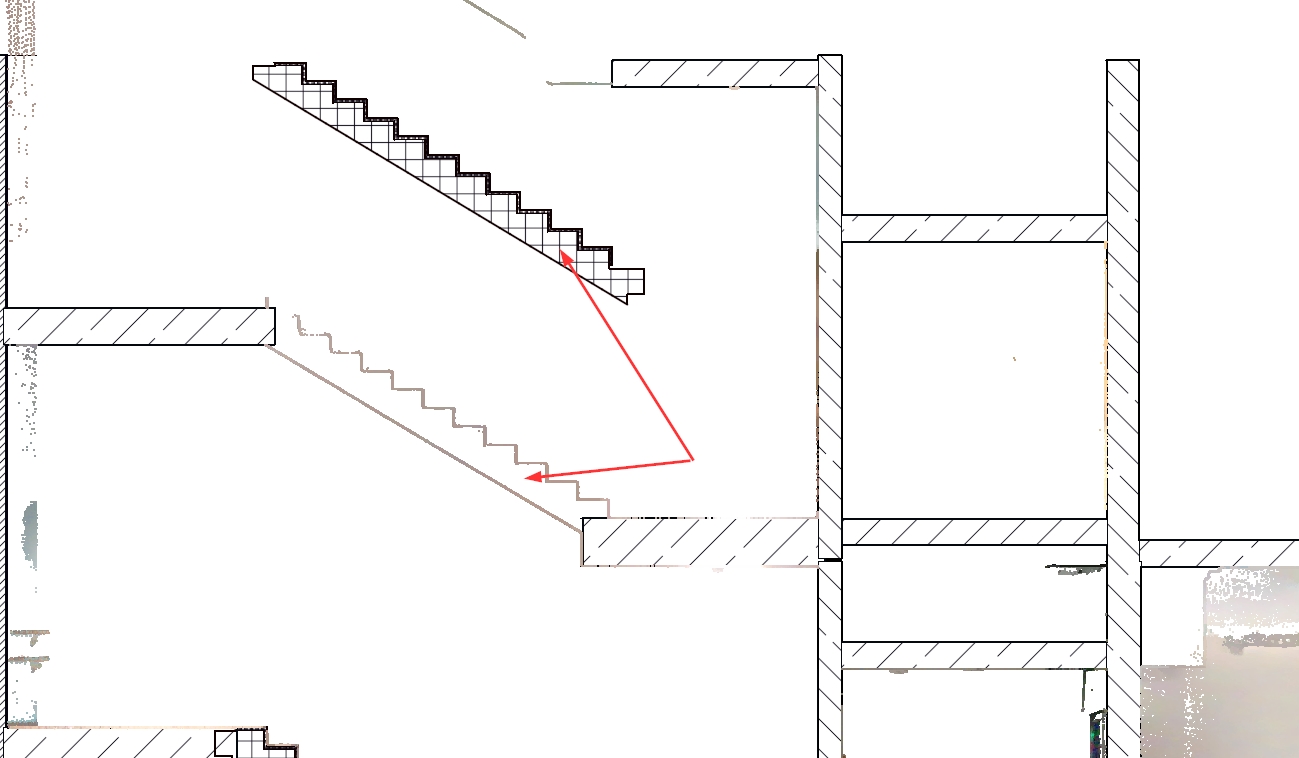
| Stairs | Complete stair modelled in the wrong position | offset by roughly half a storey | Landings, headroom and connections unusable |
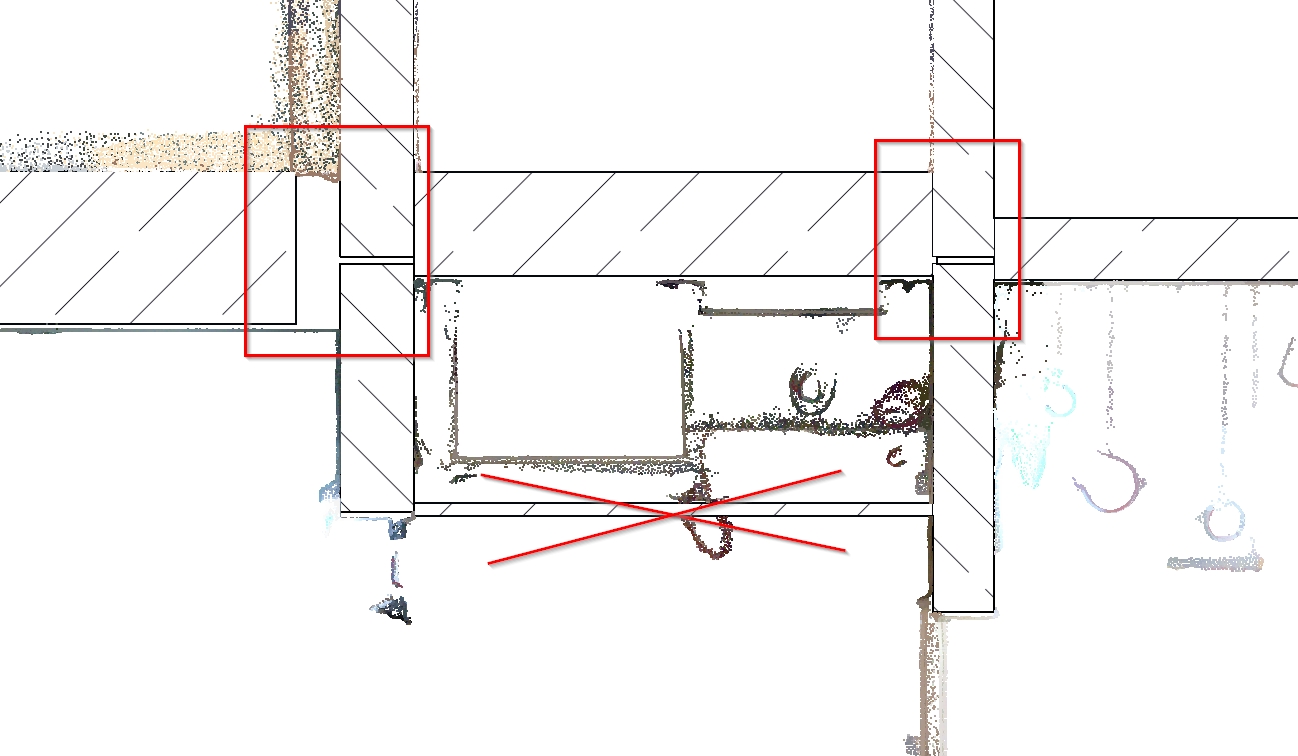
| Impossible geometry | Floor slab inside an elevator shaft | not physically possible | Model never passed a plausibility check |
| Missing or extra elements | Suspended ceiling missing, bulkhead modelled without scan data | visible in the point cloud | MEP coordination and clear heights unreliable |
| Connections | Gaps between wall heads and beams, offset wall-slab junctions | visible in sections | Wrong quantities, open volumes, faulty sections |
Why these errors are not a tolerance issue
Every Scan to BIM model has a tolerance. Depending on the agreed level of detail, small deviations between model and point cloud are normal and documented. The errors in this model are different in kind: a stair half a storey away from its real position, a 36 cm difference in wall height or a slab inside an elevator shaft cannot be explained by modelling tolerance.
They point to a model that was built without systematic comparison against the scan data, or from assumptions and old drawings instead of measurements. That is the key risk: a model can look clean in 3D and still be wrong in its basic structure.
What it costs to plan with a model like this
- Quantities and tenders: wall areas, floor build-ups and volumes are wrong, which leads directly to incorrect bills of quantities and later claims.
- Design and approvals: wrong clear heights, headroom and stair geometry affect fire escape routes, accessibility and building permit documents.
- MEP coordination: missing suspended ceilings and wrong ceiling voids make clash detection meaningless.
- Construction site: errors discovered on site cause redesign, delays and extra costs, at the most expensive point in the project.
How to check a BIM model against the point cloud: 6 steps
- Load model and registered point cloud into the same coordinate system and verify the alignment at fixed reference points.
- Cut horizontal and vertical sections on every storey, including stair cores, shafts and roof areas.
- Measure floor levels, ceiling undersides and wall heights against the point cloud and compare with the agreed tolerance.
- Check stairs, elevator shafts and openings for position and technical plausibility.
- Check element connections: walls to slabs, walls to beams, landings to stairs.
- Document every deviation with location, image and measured value, and classify it by impact.
Repair or rebuild?
When deviations are isolated, a targeted correction can make sense. When they are systematic, as in this case, every element would have to be checked and adjusted individually. The effort then approaches a new model without reaching its quality, because errors in levels and storey references are carried into many dependent elements. In such cases we recommend rebuilding the model directly from the point cloud, and we explain our recommendation in writing so that you can decide on a clear basis. We describe this approach in more detail in our article on quality over quantity.
How VMTS prevents these errors
- Point cloud check before modelling: registration, coordinate system and completeness are checked by our Geomatikers before the first element is created.
- Modelling directly from the point cloud: levels, wall heights and stair geometry are taken from the measured data, not from assumptions.
- Section control per storey: model and point cloud are compared systematically against the tolerance agreed for each element group.
- Plausibility check: stairs, shafts, elevators and connections are checked for technical logic.
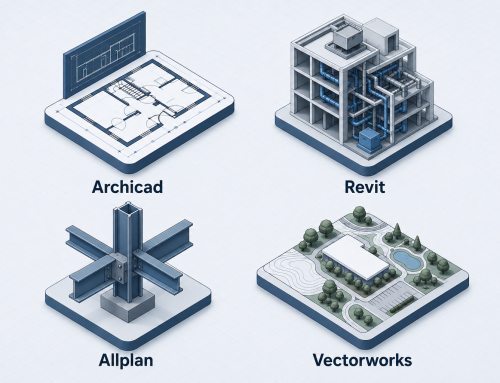
- Documented delivery: native file for your platform (Archicad, Revit, Allplan, Vectorworks), IFC and a QC report showing the checked points.
VMTS has worked exclusively on point cloud to BIM since 2014, with a team of 100+ for surveying and architecture firms, mainly in the DACH region. Our principle is simple: You scan – we support all downstream services, from point clouds to native BIM models. A model that leaves our office has been compared with the point cloud, not just drawn next to it.
Frequently asked questions
How do I know whether an existing BIM model is accurate?
Overlay the model with the registered point cloud and compare sections on every storey. Measure floor levels, ceiling heights and wall positions and check them against the agreed tolerance. Without this comparison, the accuracy of a model cannot be confirmed.
What deviation between BIM model and point cloud is acceptable?
That depends on the level of detail and tolerance agreed in writing for each element group. Small deviations within that tolerance are normal. Deviations of 16 to 36 cm in levels and wall heights, as in this case, are far outside any usual modelling tolerance.
Should a faulty BIM model be repaired or rebuilt?
Isolated errors can be corrected. If deviations are systematic and affect levels, stairs and storey references, a rebuild from the point cloud is usually more reliable and often not more expensive than a complete check and repair.
Can VMTS check a model that was created by another provider?
Yes. Send us the model and the point cloud. We compare them in sections, document the deviations with images and measured values, and give you a written recommendation.
What do I receive from VMTS after a Scan to BIM project?
A native model for your platform, an IFC file and a QC report in which the checked points are documented. The level of detail and tolerance are agreed per element group before modelling starts.
Have an existing model checked
Do you want to reuse an existing 3D model, or are you unsure about its accuracy? Send us the model and the point cloud. We would be happy to check it and give you a clear recommendation before you plan with it.
Related pages: Scan to BIM service · Quality over quantity · Why cheap CAD/BIM services can destroy your reputation · Point cloud accuracy in BIM · Level of Detail LOD 100 to LOD 400 · The people behind BIM accuracy
Nguyen Huynh (Rainer)

About the Author:
Nguyen Huynh (Rainer) is Managing Director at VMT Solutions, specializing in Point Cloud to BIM workflows for surveying, planning, and engineering offices. He focuses on precise BIM models, clearly defined quality standards, and long-term technical partnerships.
Share This Story!
Related Posts


Recent Posts


We are proud to have
satisfied customers.

 Gerd Gindullis, Lecturer for digital as-built data capture at Aachen University of Applied Sciences, TerraMeta 3D Laser Service
 Stefan Schramm, Architekt Stefan Schramm
„Your plans are perfect; I’ve never seen anything like this before. These are drawings of the highest quality, I must say. I want to express my sincere thanks once again for your work.“
 Endre Szokolai, Digitalplan-Szokolai
VMT modeled a large industrial building in 3D for our research project. We provided DWG plans to VMT, and they delivered a highly detailed model, including the building envelope, interior walls, openings, and stairs. We had previously contracted a German company for the same object, but unfortunately, it didn’t work out. I was relieved and pleased that VMT handled it so reliably. Thank you for the excellent work and the truly fair price!

Very reliable company, courteous staff, and top-quality work. Our plans were created quickly and accurately. Thank you for that. Highly recommended.

Excellent advice and high 3D modeling quality at a great price-performance ratio… What more could you want? I can highly recommend them…